Search This Blog

Showing posts with label Mobile Corner. Show all posts

gravatar

Review Windows Phone 8.1 Lumia 630


OS
System terasa lebih stabil, banyak aplikasi socmed yg berjalan dan dg ram yg hanya 512 masih terasa smooth.
Keterbatasan ram emang gak bisa di pungkiri, terutama utk multitasking, saat switch antar aplikasi sering kali resuming, hal ini sepertinya trik wp dalam mengatasi keterbatasan ram.
Bagi yg berkecimpung di dunia IT/networking mungkin akan langsung menemui sedikit masalah, karena wp tidak menyediakan setting IP secara manual.

APLIKASI
Sudah jelas andro rajanya, jumlah/ketersediaan aplikasi di wp masih sedikit dan fitur dalam aplikasi nya pun masih terbatas (basic fitur). Belum banyak dev besar yg bermain di wp. Utk browsing selain Internet Explorer (IE) hanya UC dan Opera mini versi beta, banyak juga browser yg lain tapi dari dev yg belum terpercaya, dan semua browser yg ada mengandalkan engine dari ie, jadi apabila ada web yg gk kompatibel dg ie ya gk ada pilihan lain, meskipun hal ini jarang ditemui dan dari beberapa bulan mencoba wp baru aliexpress versi mobile (m.aliexpress.com) yg gk bisa di buka di wp.
Utk keseharian (browsing, chat, socmed) memang sudah mencukupi meski dg basic fitur. Jangan berharap banyak ada aplikasi google di wp, hanya tersedia google search, yg lainnya diganti dg aplikasi milik Microsoft/nokia.
Selain fitur dari aplikasi yg terbatas, update nya pun masih lambat/jarang, terlihat kalau dev belum/tidak mengutamakan pengembangan aplikasi nya di wp.

TAMPILAN
Utk tampilan fisik dan material yg digunakan cukup baik, di tambah dengan brand yg sangat ternama membuat pede pemakainya.
Utk user interfase tergantung penilaian masing², tapi yg jelas kastumisasi sangat terbatas, kalau di andro kita bisa pilih launcher n themes sesuai selera, di wp jangan berharap banyak.


KESIMPULAN
Utk penggunaan sehari-hari memang sudah cukup, performa dan manajemen memori yg cukup baik menjadikan kelebihan tersendiri wp.
Bagi yg gk ingin neko² dan ingin tampil beda dg bugjet terbatas, wp bisa menjadi salah satu opsinya.
Bagi yg bergelut di dunia IT atau seneng oprek, mungkin akan menemukan banyak kendala, disamping jumlah aplikasi yg terbatas juga komunitas yg masih sedikit (terutama komunitas opreker 😝). Tapi bisa juga jadi tantangan tersendiri bagi yg ingin explore wp dan peluang mengembangkan aplikasi utk wp masih terbuka lebar (belum banyak saingan) dan mungkin saja nanti wp bisa bersaing dg andro.
Utk pengguna biasa atau yg suka mengikuti trend, wp mungkin bukan pilihan yg tepat.
So.. Tentukan sendiri pilihanmu

gravatar

FLASH FIRMWARE SAMSUNG CHAMP DUOS GT – C3312

Tools dan program :
1. Kabel data samsung champ (Mini usb) atau pakai kabel CA-101
2. program A FlashTool EM_XMM2150 , Kalau belum punya bisa download.
3. Firmware SAMSUNG CHAMP DUOS GT – C3312
4. Driver SAMSUNG CHAMP DUOS GT – C3312

Cara Flashing :

1. Backup data
    Menu -> Settings -> Backup Manager -> Pilih Backup yang Anda inginkan.
2. Extract program Flasher [FlashTool_E2.exe] yang sudah di download tadi
3. Extract semua file firmware.
4. Buka atau Jalankan program Flasher [FlashTool_E2.exe]
 - Setting Default :
 - Custom Order : Centang
 - Erases Calibration! : Erase whole flash before download
 - Baud Rate: 921600
 - Communication Driver: Infineon USB Driver.
5. Pilih add > masukan semua file firmware
6. Urutkan sesuai urutan berikut :
- C3312xxxxx_psi.fls
- C3312xxxxx_slb.fls
- C3312xxxxx_BSY.fls
- C3312xxxxx_CDS.fls
- C3312Oxxxx_CSC.dffs

7. Klik Next
8. Hubungkan HP ke PC dalam keadaan Boot Mode (baca petunjuk di bawah)
9. Klik Start USBx
10. Tunggu hingga Proses Flash selesai.

Cara Masuk Boot Mode : 
- Matikan HP (cabut lalu pasang batre)
- Tekan bersamaan tombol “Volume Bawah” Dan “Power”
- Anda melihat Gambar handphone dengan Panah Menghadap ke bawah.

DOWNLOAD :
Samsung Flash Driver
Flash Tool
Firmware (EN)
Firmware (ID)

gravatar

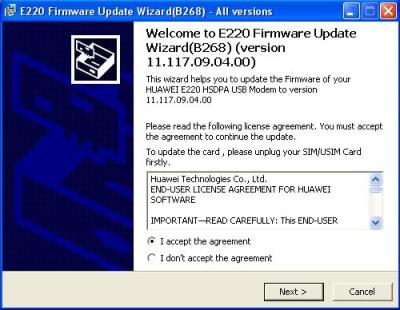
Unlock Modem Huawei E220

Buat yang punya modem huawei E220 dari indosat 3g atau telkomflash berikut tutorial cara unlock modemnya. Tutorial unlock modem huawei E220 indosat dan telkomflash ini didapat dari sumber namakuaji.wordpress.com.

Semoga tutorial unlock modem huawei E220 ini berguna, berikut caranya :

Cara Unlock Modem Huawei E220 Indosat 3.5 G :
1. Keluarkan SIM Card dari dalam Modem Huawei E220 (tidak terpasang)
2. Hubungkan Modem Huawei E220 ke PC/Laptop
3. Install Firmware Update E220Update_11_117_09_04_00_B268

Read more »

gravatar

Usefull Mobile Java Application Modif By Handler

/This my collection for mobile application(java) modification by handler that may can be usefull to get free internet access with little trick..

1. Gmap 232 HandlerUI
http://wapshare.us/13241
2. Operamini 5.1 HandlerUI143

http://wapshare.us/112554

3. Operamini Mod 4.2t7 HandlerUI200b3
http://wapshare.us/113707
4. Operamini 4.2 HandlerUI150R2
http://wapshare.us/112114
5. UCWeb 7.2 HandlerUI200b1
http://wapshare.us/112912
6. Bolt Browser 231 HandlerUI200b
http://wapshare.us/113450
7. Ebuddy 201 HandlerUI150
http://wapshare.us/113495

enjoy with it..
Will be update...

gravatar

NOKIA S40 Java Prov Maker

Bagi yang punya ponsel Nokia S40 Series, pasti akan kesulitan kalau ingin menggunakan setingan proxy yang non standar. Berikut ini adalah cara membuat setingan proxy (file .prov).Type hape yg termasuk S40 adalah:
2330, 2700, 3600slide(baru), 5000, 5130, 5200, 5220, 5300, 5310, 5610, 6300, 6500, 6600slide(baru), 6600fold, 6600 8Mp, 6700c, 7210supernova, 7310supernova, 7390, 7610supernova, dan lain-lain.
Jika type hape anda seperti diatas untuk menggunakan setingan proxy non standar harus menggunakan java proxy( file .prov ).

Cara 1 :

1. Download dulu prov generator provmaker.rar.
2. Extract,  trus jalankan programnya
3. Isikan parameter yang di perlukan (Namasetingan/APN/IP Proxy/Port) lalu Generate.
4. Kirim  file yang sudah terbentuk tadi ke HP S40 anda.
5. Buka file di yang sudah terkirim di ponsel, dan lakukan install.
6. Lalu pilih pengaturan konfigurasi gprs di ponsel anda

Cara 2 :
1. Kunjungi http://ext.unli.tk/prov (lebih praktis melalui ponsel)
2. Masukkan parameter yang diperlukan
3. Donlod dan install di ponsel

Demikian Semoga bermanfaat.

gravatar

Setting GPRS dan MMS (Indonesia GSM Provider)

MATRIX
Setting OTA:
Kirim SMS ke888 dengan pesan :
ACT[spasi]GPRS

MENTARI
Setting OTA via SMS :
Kirim SMS ke3000 dengan pesan :
Ketik : GPRS[spasi] merk HP[spasi] tipe HP

Setting Manual :
GPRS
Profile Name : INDOSATGPRS
Homepage URL : http://wap.klub-mentari.com
IP Address : 10.19.19.19
Bearer : GPRS
User Name : indosat
Password : indosat
APN : indosatgprs

MMS
Profile Name : INDOSATGPRS
Homepage URL : http://mmsc.indosat.com
IP Address : 10.19.19.19:8080
Bearer : GPRS
User Name : indosat
Password : indosat
APN : indosatmms

IM3
Setting OTA via SMS :
Kirim SMS ke3939 dengan pesan :
Ketik : GPRS[spasi] merk HP[spasi] tipe HP

Setting Manual :
GPRS
Connection name : M3-GPRS
Access point name : www.indosat-m3.net
User name : gprs
Password : im3
Authentication : Normal
Homepage : http://wap.indosat-m3.net
IP address : 010.019.019.019
Port : 9201 (standard), 8080 (proxy)

MMS
Connection name : M3-MMS
Access point name : indosatmms
User name : indosatmms
Password : indosatmms
Authentication : Normal
Homepage : http://mmsc.indosat-m3.net
IP address : 010.019.019.019
Port : 9201 (standard), 8080 (proxy)

Read more »

gravatar

WM5 or WM6 Registry Tweaks - Performance

Disable menu animations
To disable menu animations (sliding in/out) and speed up performance of the UI a bit:
HKLM\SYSTEM\GWE\Menu\AniType = 0 (DWORD decimal)

To change it back to the default:
HKLM\SYSTEM\GWE\Menu\AniType = 6 (DWORD decimal) 


Pocket IE to Version 5.5 (For Secured Sites)
1)  Go to the HKLM\SOFTWARE\Microsoft\Windows\CurrentVersion\Internet Settings\User Agent\ key.
2) Set the default value to "Mozilla/4.0" (Default is "Mozilla/2.0").
3) Set the "Version" value to "MSIE 5.5" (Default is "MSIE 3.02").
4) Set the "Platform" value to "Windows NT 5.0" (Default is "Windows CE").
This will only work on some secure sites that check version number rather than perform a check for support of secured transactions.

This registry hack will make Pocket Internet Explorer identify itself as IE 5.5 on Windows 2000. However it will prevent web sites that provide Pocket PC specific content to be able to know you're actually using a Pocket PC.

Change the Tap & Hold Dots Color
1) Go to the HKLM\SOFTWARE\Microsoft\Color\ key.
2) Add a Binary value called "40" if it does not already exist.
3) Set the value to "rr gg bb 00" (RGB hex values 00 to FF so "FF 00 00 00" is Red), (RGB hex values 00 to FF so "00 FF 00 00" is Green), (RGB hex values 00 to FF so "00 00 FF 00" is Blue).
 
Speed up your Display (Faster opening programs/menus)
1) Browse to HKEY_LOCAL_MACHINE\SYSTEM\GDI\GLYPHCACHE\Change the "limit" value :
2.1) 4096 : this will slow down the display, but use less memory
2.2) 8192 : this is the default value on Pocket PC, average memory/performances
2.3) 16384 : this will speed up the display, but use more memory, twice the default Pocket PC value
2.4) 32768 : Or even more
3) Reboot

Change the width and height of scroll bars
1) Browse to \HKLM\SYSTEM\GWE\
2) cyHScr : Horizontal Scrollbars Height in pixels (default is 13)
3) cxHScr : Horizontal Scrollbars Width in pixels (default is 20)
4) cyVScr : Vertical Scrollbars Height in pixels (default is 20)
5) cxVScr : Vertical Scrollbars Width in pixels (default is 13)
6) Reboot

Improve call quality
(applied to my Wizard, otherwise the person on the other end of the line says I sound too quiet).

HKEY_LOCAL_MACHINE\SOFTWARE\HTC\AUDIOGAIN 
EARPHONE_UPLINK_VOLUME "AA" 
RECEIVE_UPLINK_VOLUME "AA" 

HKEY_LOCAL_MACHINE\SOFTWARE\HTC\AUDIOGAIN0 
EARPHONE_UPLINK_VOLUME "AA" 
RECEIVE_UPLINK_VOLUME "AA" 

HKEY_LOCAL_MACHINE\SOFTWARE\HTC\AUDIOGAIN1 
EARPHONE_UPLINK_VOLUME "AA" 
RECEIVE_UPLINK_VOLUME "AA" 

HKEY_LOCAL_MACHINE\SOFTWARE\HTC\AUDIOGAIN2 
EARPHONE_UPLINK_VOLUME "AA" 
RECEIVE_UPLINK_VOLUME "AA"


MMS configuration and came at this change: 
people who are having problem with MMS configuration must apply the tweak below (people who have upgraded to WM6 this is tweak for MMS) after installing the MMS cab file (you can get it here) the apply the below change and it will solve your problem.
instead of gateway: 216.155.165.050 ... use gateway: 216.155.165.50 
u see the zero of 50 is gone so just do this and see if it works !!

Disable window animations
To disable window animations (minimizing/maximizing) and speed up performance of the UI a bit:
HKLM\SYSTEM\GWE\Animate = 0 (DWORD decimal)

And to switch them back on:

HKLM\SYSTEM\GWE\Animate = 1 (DWORD decimal)

Increase font cache
To increase the font cache, speeding up font rendering at the cost of a bit of memory:
HKLM\SYSTEM\GDI\GLYPHCACHE\limit = 16384 (DWORD decimal)

To change it back to the default:
HKLM\SYSTEM\GDI\GLYPHCACHE\limit = 8192 (DWORD decimal)

You can set the value to pretty much anything you like, but suggested values are 4096, 8192, 16384 & 32768.

Enable FileSystem cache
To enable the FileSystem cache, speeding up overall performance at the risk of the cache not being written on a sudden reset:
HKLM\System\StorageManager\FATFS\EnableCache = 1 (DWORD decimal)

To disable again:
HKLM\System\StorageManager\FATFS\EnableCache = 0 (DWORD decimal)

Note that by default, the cache size is zero, and you will see no effect. See "Increase FileSystem cache" below to increase the cache size.

Increase FileSystem cache
To increase the file system cache:
HKLM\System\StorageManager\FATFS\CacheSize = 4096 (DWORD decimal)

To return the file system cache to zero:
HKLM\System\StorageManager\FATFS\CacheSize = 0 (DWORD decimal)

You can set the value to pretty much anything you like.

Increase FileSystem filter cache
To enable the file system filter cache, speeding up overall performance with file mangement:
HKLM\System\StorageManager\Filters\fsreplxfilt\ReplStoreCacheSize = 4096 (DWORD decimal)

To return the file system filter cache to zero:
HKLM\System\StorageManager\Filters\fsreplxfilt\ReplStoreCacheSize = 0 (DWORD decimal) 

 
File Locations : 

Change the location of My Documents
Documents are opened in and saved to the device's internal storage by default. You can change this location to, for example, your Storage Card:
HKLM\Software\Microsoft\Windows CE Services\FileSyncPath = "\Storage Card\My Documents" (REG_SZ string, no quotes)

To return to the original location:
HKLM\Software\Microsoft\Windows CE Services\FileSyncPath = "\My Documents" (REG_SZ string, no quotes)

Change the location of email and attachments
When reading and sending email in Pocket Outlook, emails and their attachments are saved in the device's internal storage by default. You can change this location to, for example, your Storage Card:
HKCU\Software\Microsoft\MAPI\PropertyPath = "\Storage Card\Mail" (REG_SZ string, no quotes) HKCU\Software\Microsoft\MAPI\AttachPath = "\Storage Card\Mail\Attachments" (REG_SZ string, no quotes)

To return to the original location:
Just simply delete these Registry settings (since neither is included by default).

Change the location of Temporary Internet Files
When browsing the web, pages and images are saved in the 'Temporary Internet Files' location. You can change this location to, for example, your Storage Card:
HKCU\Software\Microsoft\Windows\CurrentVersion\Explorer\Shell Folders\Cache = "\Storage Card\cacheie" (REG_SZ string, no quotes)

To return to the original location:
HKCU\Software\Microsoft\Windows\CurrentVersion\Explorer\Shell Folders\Cache = "\Windows\Profiles\guest\Temporary Internet Files" (REG_SZ string, no quotes)

Change the location of Ringtone file storage
WM5 will look for Ringtones in \Windows\ or \Windows\Rings by default. You can change this location to, for example, your Storage Card (example given is for ringtones placed on the Storage Card root folder)
HKCU\ControlPanel\?SoundCategories\Ring\Directory = "\Storage Card\" (REG_SZ string, no quotes)

To return to the original location:
HKCU\ControlPanel\?SoundCategories\Ring\Directory = "\Windows\Rings\" (REG_SZ string, no quotes)

Note the default location may be "\Windows\" or "\Windows\Rings\" depending on your Device provider.

Make WM5 ask where to install a program (1)
If you wish to be able to specify whether to install a program on WM5's Main storage, or your Storage Card, regardless of installer setting set:
HKLM\Software\apps\Microsoft Application Installer\fAskDest = 1 (DWORD decimal)

To disable again:
HKLM\Software\apps\Microsoft Application Installer\fAskDest = 0 (DWORD decimal)

Please note that many applications do not support being installed on the Storage Card and may behave unpredictably, including crashing.

Make WM5 ask where to install a program (2)
An alternative method of making WM5 ask where to install a program is by adding the "/askdest" option to the Windows CE loader:
HKCR\cabfile\Shell\open\command = 'wceload.exe "%1" /askdest' (REG_SZ string, no quotes)

Make WM5 keep CAB files around after installing (1)

If you wish to keep the original .CAB file around after installing the application, set:
HKLM\Software\apps\Microsoft Application Installer\nDynamicDelete = 0 (DWORD decimal)

Or to restore to the default:
HKLM\Software\apps\Microsoft Application Installer\nDynamicDelete = 2 (DWORD decimal)

Make WM5 keep CAB files around after installing (2)
An alternative method of making WM5 keep the original .CAB file around after installing the application is by adding the "/nodelete" option to the Windows CE loader:
HKCR\cabfile\Shell\open\command = 'wceload.exe "%1" /nodelete' (REG_SZ string, no quotes)

Make WM5 prompt before overwriting an existing installation
If you wish to make WM5 prompt you before overwriting an existing installation, set:
HKLM\Software\apps\Microsoft Application Installer\fAskOptions = 1 (DWORD decimal)

To disable again:
HKLM\Software\apps\Microsoft Application Installer\fAskOptions = 0 (DWORD decimal) 

Improve Sound Quality of Speaker Phone
You might have observed that when you turn on speaker while during a call, the other person has complained of too much disturbance on the line and can hear more of static then your voice. Here's a fix to improve mic sensitivity:
HKLM\Software\HTC\AUDIOGAIN(x)\RECEIVE_UPLINK_VOLUME = CC (DWORD hexadecimal)
HKLM\Software\HTC\AUDIOGAIN(x)\EARPHONE_UPLINK_VOLUME = CC (DWORD hexadecimal)

where (x) = none, 0, 1, 2

Disable the security warning when installing non-certified application
To disable the security warning when installing a non-certfied application, set:
HKLM\Security\Policies\Policies\0000101a = 1 (DWORD decimal)

To restore the warnings:
HKLM\Security\Policies\Policies\0000101a = 0 (DWORD decimal)

Note that this makes it easier for any malware to install itself