Search This Blog

Archives

gravatar

WinXP USB Flashdisk Installer


Tips ini mungkin sangat berguna bagi anda pemakai netbook, terutama kalau tidak memiliki CDROM external atau converter ide/sata to usb. Sekarang anda tidak perlu lagi mencari cdrrom external dsb, cukup dengan flashdisk minimal 1Gb anda bisa menginstall win xp ke netbook/notebook/pc yang support usb boot.

Berikut ini adalah cara membuat windows xp installer menggunakan USB Flashdisk.

Alat-alat yang harus di persiapkan :
- Usb Flash disk apa aja ( Min 1GB lebih besar lebih bagus).
- File iso image winxp ato cd installer winxp (harus pake cdrom drive)
- Download Program berikut ini USB_MultiBoot_10.zip

Tahapan :
- Colokan usb flashdisk
- Extrak file iso image winxp ke sembarang folder.
- Extrak usb_multiboot_10 yang sudah di download..
- Jalankan usb_multiboot_10.cmd
- Format usb flashdisk dengan ntfs.
- selanjutnya tinggal 1.. 2.. 3..
- Selesai,,,

Usb Flashdisk anda sudah siap di gunakan untuk menginstall winXP ke netbook anda..

gravatar

Usefull Mobile Java Application Modif By Handler

/This my collection for mobile application(java) modification by handler that may can be usefull to get free internet access with little trick..

1. Gmap 232 HandlerUI
http://wapshare.us/13241
2. Operamini 5.1 HandlerUI143

http://wapshare.us/112554

3. Operamini Mod 4.2t7 HandlerUI200b3
http://wapshare.us/113707
4. Operamini 4.2 HandlerUI150R2
http://wapshare.us/112114
5. UCWeb 7.2 HandlerUI200b1
http://wapshare.us/112912
6. Bolt Browser 231 HandlerUI200b
http://wapshare.us/113450
7. Ebuddy 201 HandlerUI150
http://wapshare.us/113495

enjoy with it..
Will be update...

gravatar

Update D-link Firmware DSL-520B/526B/2542B

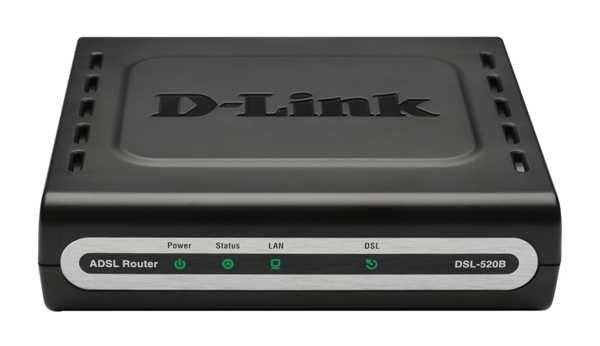
DSL-520B/526B bisa dibilang adalah ADSL modem router sejuta umat. Bagi pengguna Speedy pasti mengetahui (atau sudah menggunakan) ADSL modem router ini. Dan bagi anda yang ingin meningkatkan kemampuan ADSL modem router ini dapat mengupdatenya dengan firmware terbaru yang bisa di download dari situs resmi d-link. Adapun step-by-step update firmware secara tertulisnya silahkan ikuti dibawah : (contoh menggunakan DSL-2542B, utk DSL-520B/526B sama, hanya beda file firmware saja)

1. Hidupkan DSL-2542B anda dan plug sebuah PC/Laptop ke port Ethernet pada modem anda scr langsung
2. Download firmware DSL-2542B terbaru disini http://support.dlink.co.id/firmware/DSL-2542B-SE_1.11_08042009.rar
3. Extract file tsb ke directory D:\

Read more »

gravatar

NOKIA S40 Java Prov Maker

Bagi yang punya ponsel Nokia S40 Series, pasti akan kesulitan kalau ingin menggunakan setingan proxy yang non standar. Berikut ini adalah cara membuat setingan proxy (file .prov).Type hape yg termasuk S40 adalah:
2330, 2700, 3600slide(baru), 5000, 5130, 5200, 5220, 5300, 5310, 5610, 6300, 6500, 6600slide(baru), 6600fold, 6600 8Mp, 6700c, 7210supernova, 7310supernova, 7390, 7610supernova, dan lain-lain.
Jika type hape anda seperti diatas untuk menggunakan setingan proxy non standar harus menggunakan java proxy( file .prov ).

Cara 1 :

1. Download dulu prov generator provmaker.rar.
2. Extract,  trus jalankan programnya
3. Isikan parameter yang di perlukan (Namasetingan/APN/IP Proxy/Port) lalu Generate.
4. Kirim  file yang sudah terbentuk tadi ke HP S40 anda.
5. Buka file di yang sudah terkirim di ponsel, dan lakukan install.
6. Lalu pilih pengaturan konfigurasi gprs di ponsel anda

Cara 2 :
1. Kunjungi http://ext.unli.tk/prov (lebih praktis melalui ponsel)
2. Masukkan parameter yang diperlukan
3. Donlod dan install di ponsel

Demikian Semoga bermanfaat.

gravatar

Speed up the display of Delphi list components


If you use a Delphi component like a ListBox, Memo, TreeList, ListView,... and you add or modify a lot of items (lines, nodes,...), the component's performance becomes very slow. This is due to the fact that after each change, it is redrawn on the screen.

Thus, modifying 10000 items of a ListBox causes 10000 redraws, and that takes from several seconds to several minutes, depending on the computer's speed and the complexity of the process. Imagine how slow it can become if the process involves inserting, deleting, modifying and swapping many thousands of items.

But you can speed up things enormously with the following tip:

Call BeginUpdate before making the changes to the items. When all changes are complete, call EndUpdate to show the changes on screen. BeginUpdate and EndUpdate prevent excessive redraws and speed up processing time when items are added, deleted, or inserted.

Read more »